
Category: Photo Guides
You’ve just spent hours capturing the perfect sunrise over the coastline or the intricate details of a high-end wedding. You’ve edited them to perfection, and now you’re ready to share them with the world. But then, the reality of the web hits. Your website takes five seconds to load, or worse, your crisp, professional shots look like they were taken with a flip phone from 2005.
We’ve all been there. As photographers, we want the highest quality possible, but as business owners, we need speed. Finding that middle ground is where image compression comes in. However, compression isn't just about making files smaller; it's about doing it smartly. Most photographers are making at least a few critical errors that hurt their SEO, their user experience, and their professional reputation.
Today, we’re diving into the seven most common mistakes you’re likely making with your image compression and how Pixel-Shrink.com: which is proudly sponsored by the workflow experts at proshoot.io: fixes them instantly.
1. The "Deep Fried" Look: Over-Compressing Everything
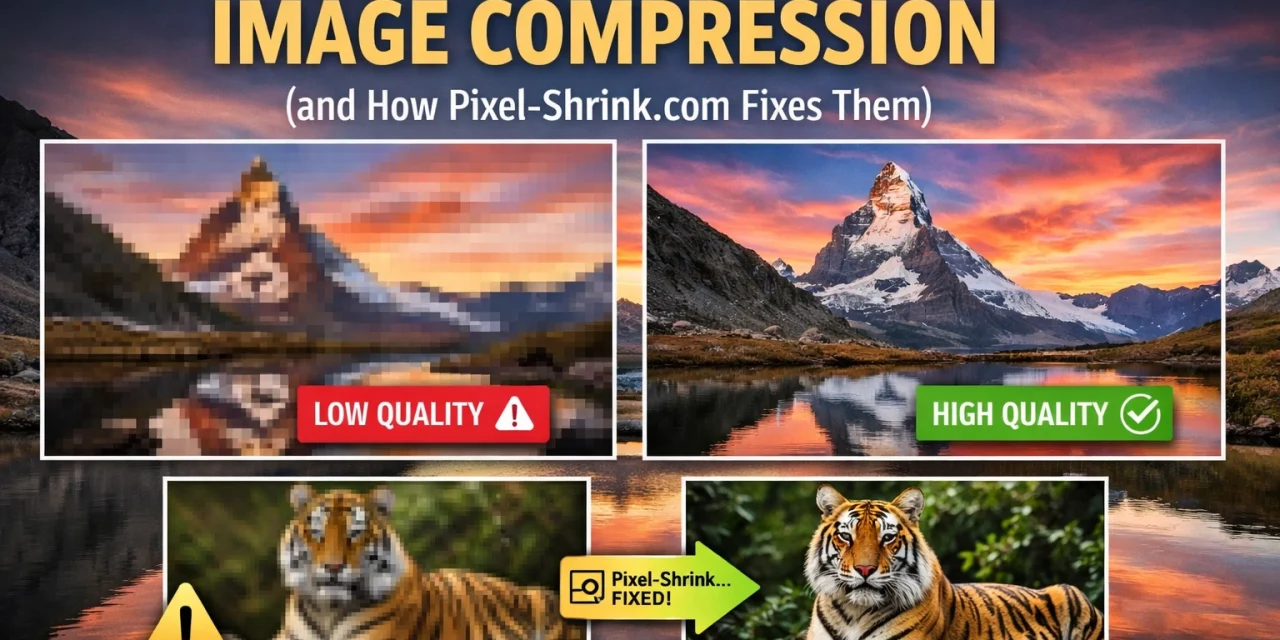
The most common mistake is being a bit too aggressive with the slider. We get it: you want your site to load in the blink of an eye. But when you push compression too far, you get what we call "artifacts." These are those weird, blocky patterns in the sky or the muddy textures in a subject’s skin.
Over-compressing makes your work look unprofessional. If you’re trying to sell prints on a site like Edin Fine Art, the last thing you want is a preview image that looks pixelated.
How Pixel-Shrink.com Fixes It: Instead of a dumb slider that treats every image the same, Pixel-Shrink uses an intelligent algorithm designed specifically for photographers. It analyzes the detail in your photo and applies the maximum amount of compression before any visible quality loss occurs. It finds that "sweet spot" (usually around 75-85% for JPEGs) automatically.

2. Using the Wrong File Format for the Job
Are you uploading PNGs for your portfolio shots? If so, you’re likely killing your page speed. PNGs are fantastic for logos or graphics with transparency, but for a high-detail photograph, they are massive compared to JPEGs. On the flip side, using a JPEG for a logo with text can lead to "ghosting" around the letters.
With the web evolving, many photographers are also ignoring WebP: a modern format that offers significantly smaller file sizes than JPEG at the same quality.
How Pixel-Shrink.com Fixes It: The tool allows you to easily convert between formats while you compress. It can take your heavy JPEGs and turn them into lightweight WebP files, ensuring your educational content or blog posts load instantly on any browser.
3. The "Mega-Pixel" Upload: Forgetting to Resize First
This is the biggest "silent killer" of website performance. Let’s say you’re using one of the latest bodies from our camera reviews 2024 list. You’ve got a 50-megapixel file. If you upload that 8000-pixel-wide image to your blog, even if you compress it, the file is still structurally massive.
Your website usually only needs an image to be 1500 to 2500 pixels wide at the absolute maximum. Uploading the full resolution and letting the browser "shrink" it visually doesn't save any data; the user still has to download the whole 10MB file.
How Pixel-Shrink.com Fixes It: Pixel-Shrink encourages a "resize then compress" workflow. By scaling your image down to the actual display dimensions you need, you can often reduce file size by 80% before you even touch the compression settings.
4. The Generation Trap: Compressing a Compressed Image
JPEG is a "lossy" format. This means every time you save it, the computer throws away a little bit of data. If you export a photo from Lightroom at 70% quality, then run it through a basic online compressor, and then your website’s plugin compresses it again, you are dealing with "generation loss." By the time the viewer sees it, the image has been "chewed up" three times.
This is especially dangerous for high-stakes work like wedding photography insights where skin tones and soft gradients are everything.
How Pixel-Shrink.com Fixes It: The platform is designed to handle high-quality originals. By starting with a high-bitrate export and using Pixel-Shrink as your final step, you maintain the integrity of the image while shedding the unnecessary metadata and weight.
5. Desktop Bias: Not Testing on Mobile Devices
It looks great on your 32-inch 4K monitor, so it must be fine, right? Wrong. Most of your clients are likely looking at your work on their phones while grabbing coffee at one of those restaurants in downtown Golden.
A compressed image that looks "okay" on a big screen might show banding or strange color shifts on a high-density mobile display. If your images aren't optimized for mobile, you're losing the majority of your audience.
How Pixel-Shrink.com Fixes It: Because Pixel-Shrink focuses on maintaining "perceptual quality," it ensures that the image looks identical to the human eye across all devices. It removes the data the eye can't see while keeping the stuff that makes your Atlanta event photography pop.

6. Ignoring Metadata Bloat
When you export a photo, it often carries a lot of "luggage." This includes GPS data, camera serial numbers, lens settings, and even your edit history. While this is great for your own archives, it adds several kilobytes to every single image. If you have a gallery of 50 images, that metadata can add up to the size of an entire extra photograph.
How Pixel-Shrink.com Fixes It: It gives you the option to strip non-essential EXIF data. This keeps your files lean and protects your privacy (so people aren't tracking down the exact location of your Miami hidden speakeasies shoot if you want to keep it a secret).
7. The "Naked" Upload: Not Compressing at All
Some photographers are so afraid of losing quality that they don't compress at all. They upload 15MB files straight to their site. This is a disaster for SEO. Google penalizes slow websites, and users will bounce if a page takes more than a couple of seconds to load.
Whether you’re showcasing essential photography gear or a travel log, speed is a ranking factor. You can't afford to ignore it.
How Pixel-Shrink.com Fixes It: It makes compression so fast and easy that there’s no excuse not to do it. Backed by the efficiency of proshoot.io, Pixel-Shrink is built into the workflow of pro photographers who need to move fast without sacrificing their artistic vision.

Why Pixel-Shrink.com is the Pro Choice
If you’ve been following Edin’s journey over at the Edin Chavez Blog, you know we’re all about efficiency. We don't want to spend all day behind a computer; we want to be out shooting.
Pixel-Shrink.com was built to solve the specific frustrations photographers face. It isn't just a generic file shrinker; it’s a tool that understands texture, light, and color. By partnering with proshoot.io, the tool ensures that your delivery process: from the moment you finish an edit to the moment the client sees the gallery: is seamless.
How to Improve Your Workflow Today
If you want to stop making these mistakes and start providing a better experience for your clients, here is a quick checklist for your next upload:
- Export at 100% or 90% from your editor. Don't let the editor do the heavy compression.
- Resize to the target width. (e.g., 2000px for full-width headers, 800px for blog inserts).
- Run it through Pixel-Shrink.com. Let the AI handle the math.
- Check the preview. Ensure the details in the shadows and highlights are still there.
- Upload and enjoy the speed.

Final Thoughts
Photography is a visual medium, but the web is a technical one. To succeed, you have to master both. You don't have to sacrifice the soul of your images just to make your website load faster. By avoiding these seven common mistakes and using a professional-grade tool like Pixel-Shrink, you can have the best of both worlds: stunning, high-quality imagery and a lightning-fast user experience.
If you’re looking for more ways to level up your photography business, check out our reviews or see how we handle photography booking experiences to keep clients coming back.
Don't let heavy files weigh down your career. Shrink the files, keep the quality, and keep shooting.













